Model Building
The first capability Synthetic gives you: describe the network you want to simulate. Every model, regardless of complexity, ends up as a ModelBuilder — a container of reactions. This page covers the three levels of control you have over what goes into one, and how to export the result for use in other tools.
The model you build here is the input to Solving ODEs — pick a solver, run a simulation, get a timecourse.
The Three Levels
The library gives you three ways to build a model, ordered by how much of the biology you write yourself:
| Level | Entry point | What you write | What you get |
|---|---|---|---|
| 1 | Builder.specify(degree_cascades=...) |
A size list [3, 5, ...] |
A VirtualCell wrapping a hierarchical Michaelis-Menten network with an auto-drug and a kinetic tuner. Fastest path. |
| 2 | DegreeInteractionSpec or MichaelisNetworkSpec directly |
Species, regulations, drugs as Python objects | A ModelBuilder with the topology chosen by the spec. Full control over what's included. |
| 3 | ModelBuilder + Reaction + ReactionArchtype |
Each reaction by hand, including rate laws | A ModelBuilder with whatever you assembled. Full control over everything. |
All three paths converge on the same downstream machinery — solvers, simulation, dataset generation, export — so picking one doesn't lock you out of anything that comes after.
Level 1 — Builder.specify(degree_cascades=...)
The shortcut. A single size parameter produces a hierarchical Michaelis-Menten network, an auto-drug, a kinetic tuner, and the make_dataset_drug_response integration — see Quick Start for the 3-line example.
from synthetic import Builder, make_dataset_drug_response

vc = Builder.specify(degree_cascades=[3, 5], random_seed=42)
X, y = make_dataset_drug_response(n=1000, cell_model=vc, target_specie='Oa')
Builder.specify is hardcoded to wrap DegreeInteractionSpec with degree_cascades=.... If you need a different topology, or full control over drugs and tuning, drop to Level 2.
Level 2 — The Spec Classes
A specification (or "spec") is a Python object that captures three things:
- Species — the named chemical entities in the model (e.g.
EGFR,pEGFR,ERK) - Regulations — how one species affects the conversion rate of another (
ERKinhibits theMEK → pMEKstep, etc.) - Drugs — special species that appear at a specified time and regulate a target
The library ships with two specs:
| Spec | Topology it produces |
|---|---|
DegreeInteractionSpec |
Hierarchical Michaelis-Menten — a stack of "degree" levels, each with N parallel cascades. Parameterized by degree_cascades=[3, 5, ...]. |
MichaelisNetworkSpec |
Arbitrary Michaelis-Menten — a flat network of N species with R random regulations. Parameterized by num_species and num_regulations. |
DegreeInteractionSpec — Hierarchical Michaelis-Menten
You can enter this spec two ways:
Builder.specify(degree_cascades=[3, 5], ...)— the Level 1 convenience wrapper.DegreeInteractionSpec(degree_cascades=[3, 5])directly — returns a spec object you then compile withgenerate_network(...)to get a bareModelBuilder. No auto-drug, no tuner. Use this when you want full control over drugs and tuning, or when you need to combine the spec with other code.
Both produce the same network topology, parameterized by degree_cascades — a list where each element is the number of parallel signaling cascades at one degree of the hierarchy:
# Either form works
vc = Builder.specify(degree_cascades=[3, 5], random_seed=42)
# 3 cascades at degree 1 (top), 5 at degree 2, plus an outcome species

# Or:
from synthetic.Specs.DegreeInteractionSpec import DegreeInteractionSpec
spec = DegreeInteractionSpec(degree_cascades=[3, 5])
spec.generate_specifications(random_seed=42, feedback_density=0.5)
# ... add drugs manually ...
model = spec.generate_network("MyNetwork")
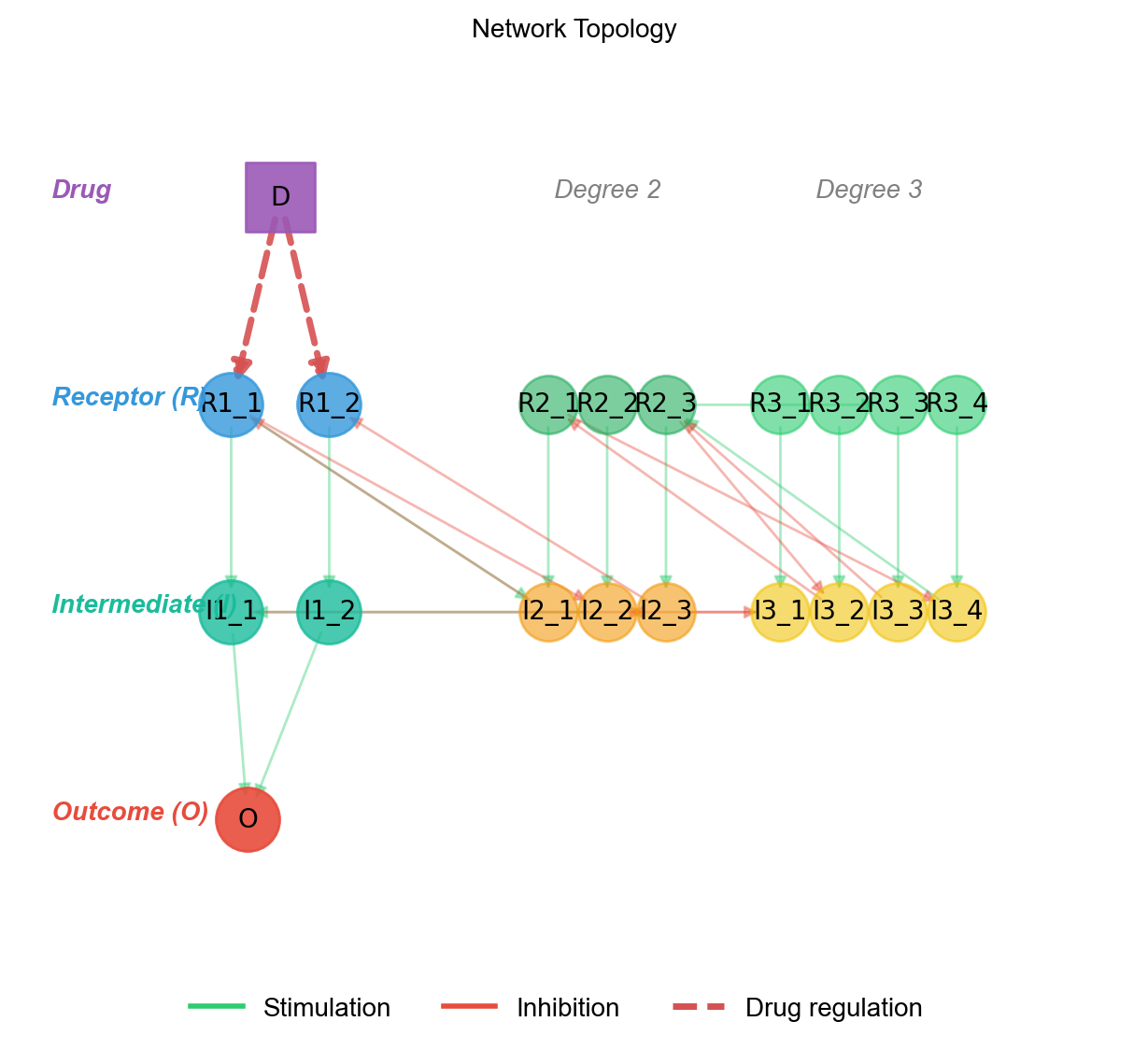
Each cascade at degree d creates a receptor species R{d}_{i} that converts (via a Michaelis-Menten reaction) into an intermediate I{d}_{i}. Degree 1 intermediates feed into the outcome O, which is converted to its activated form Oa.
graph TD
    D["Drug D"] -->|"down"| R1_1
    D -->|"down"| R1_2
    D -->|"down"| R1_3

    subgraph "Degree 1 (3 cascades)"
        R1_1 --> I1_1
        R1_2 --> I1_2
        R1_3 --> I1_3
    end

    subgraph "Degree 2 (5 cascades)"
        I1_1 --> R2_1
        I1_2 --> R2_2
        I1_3 --> R2_3
        R2_1 --> I2_1
        R2_2 --> I2_2
    end

    I1_1 --> O
    I1_2 --> O
    I1_3 --> O

    O --> Oa["Oa (target)"]

    style D fill:#ef535044,stroke:#ef5350
    style Oa fill:#4caf5044,stroke:#4caf50
Color legend: green = stimulation, red = inhibition, dashed purple = drug regulation. The diagram above shows degree 1 and a partial degree 2 for readability; a [3, 5] network actually has 5 cascades at degree 2.
The network image below is the rendered version of the same hierarchy:
Species Naming Convention
| Pattern | Meaning | Example |
|---|---|---|
R{deg}_{idx} |
Receptor species at degree deg |
R1_1, R2_3 |
I{deg}_{idx} |
Intermediate species at degree deg |
I1_1, I3_15 |
{name}a |
Activated form of a species | R1_1a, I2_1a, Oa |
O / Oa |
Outcome species (inactive / activated) | — |
The activated form is the catalytically active version. Each reaction in the network converts the inactive form of a species into its active a form, propagating the signal forward. Oa is the terminal node — what your model predicts.
Choosing a Network Size
| Goal | degree_cascades |
Notes |
|---|---|---|
| Smoke test, fast iteration | [1, 2] |
6 species, milliseconds per simulation |
| Default ML benchmark | [3, 5] |
~25 species, used in Quick Start |
| Realistic medium network | [3, 6, 15] |
~75 species, exercises 3-level regulation |
| Stress test | [3, 6, 15, 25] |
~150 species, large parameter space |
The same degree_cascades and random_seed always produces the same network.
Feedback Regulation
A purely feed-forward hierarchy is biologically unrealistic — real pathways have feedback. The feedback_density parameter controls what fraction of possible feedback edges are added:
vc = Builder.specify(degree_cascades=[3, 6, 15], feedback_density=0.5)
0— no feedback, pure feed-forward hierarchy1— every possible feedback edge present0.5(default) — half of the possible feedback edges, randomly chosen
A feedback edge means a downstream species regulates a reaction in a species upstream of it. The network picture doesn't show them — they appear as additional extra_states on reactions. To see them:
model = vc.model
print(model.get_regulator_parameter_map())
# {'I2_3': {'Kc0_J0': ...}, 'R3_5': {'Ka0_J2': ...}, ...}
MichaelisNetworkSpec — Arbitrary Michaelis-Menten
When you want Michaelis-Menten kinetics but not a hierarchical layout — e.g., a flat network of arbitrary species with arbitrary regulations — use MichaelisNetworkSpec directly. It is not exposed through Builder.specify; you instantiate it yourself:
from synthetic.Specs.MichaelisNetworkSpec import MichaelisNetworkSpec

spec = MichaelisNetworkSpec()
spec.generate_specifications(num_species=5, num_regulations=8, random_seed=42)
spec.add_drug(...)  # same Drug API as DegreeInteractionSpec
model = spec.generate_network("my_network")
generate_specifications(num_species=..., num_regulations=...) is the analogue of degree_cascades: it picks a random topology of the requested size. The species names are generated for you (S1, S2, ...) — there's no fixed naming convention because there's no fixed topology. For full control, add species and regulations manually:
spec = MichaelisNetworkSpec()
spec.add_species("EGFR"); spec.add_species("pEGFR"); spec.add_species("ERK")
# add regulations, drugs, etc.
After generate_network, the rest of the pipeline is identical — you get a ModelBuilder you can simulate, export, or pass to make_dataset_drug_response (the latter requires a VirtualCell, see the spec-wrap pattern at the bottom of the page).
Drugs
A drug is a species that appears at a specific time and regulates a target. The simplest model is "drug turns on at t=5000, then sticks around." In DegreeInteractionSpec, drugs target the degree 1 receptor species — that's the only place they bind in the canonical hierarchy. (MichaelisNetworkSpec lets you target any species.)
Auto-Drug (Default for Builder.specify)
Builder.specify() creates one drug for you, named D, that targets all degree 1 receptors with down-regulation:
vc = Builder.specify(degree_cascades=[3, 6, 15])
# vc.list_drugs() → [{'name': 'D', 'targets': ['R1_1', 'R1_2', 'R1_3'], 'types': ['down', 'down', 'down']}]
To customise the auto-drug:
vc = Builder.specify(
    degree_cascades=[3, 6, 15],
    drug_name="Inhibitor",
    drug_start_time=5000.0,    # when the drug becomes active
    drug_value=100.0,          # active concentration
    drug_regulation_type="down",
)
Manual Drug Addition
To turn off the auto-drug and add your own:
vc = Builder.specify(degree_cascades=[1, 2, 5], auto_drug=False, auto_compile=False)
vc.add_drug(
    name="DrugA",
    start_time=500.0,
    default_value=0.0,                  # value before start_time
    regulation=["R1_1", "R1_2"],       # targets (must be degree 1 R species)
    regulation_type=["down", "down"],   # "up" or "down"
    value=100.0,                        # value after start_time
)
vc.compile()
add_drug() returns self, so you can chain:
vc = (Builder.specify([5, 10, 15], auto_drug=False, auto_compile=False)
       .add_drug(name="DrugA", start_time=5000.0, regulation=["R1_1", "R1_2"],
                 regulation_type=["down", "down"], value=100.0)
       .add_drug(name="DrugB", start_time=5000.0, regulation=["R1_3", "R1_4"],
                 regulation_type=["down", "down"], value=100.0)
       .compile())
vc.list_drugs() always shows the current drug list.
Combination Therapy
Multiple drugs, different targets, same model. This is how you simulate "what if the patient is on Drug A and Drug B":
from synthetic import Builder, make_dataset_drug_response

vc = (Builder.specify([5, 10, 15], auto_drug=False, auto_compile=False)
       .add_drug(name="Drug_A", start_time=5000.0, default_value=0.0,
                 regulation=["R1_1", "R1_2"], regulation_type=["down", "down"], value=100.0)
       .add_drug(name="Drug_B", start_time=5000.0, default_value=0.0,
                 regulation=["R1_3", "R1_4"], regulation_type=["down", "down"], value=100.0)
       .compile())

X, y = make_dataset_drug_response(n=500, cell_model=vc, target_specie='Oa')
The generated dataset reflects the combined effect of both drugs — useful for testing algorithms that predict combination therapy response.
What's Inside vc
vc is a VirtualCell wrapper. Three things are useful to reach for:
# 1. The spec — the network topology (species + regulations + drugs)
spec = vc.spec
print(spec.species_list)

# 2. The compiled model — the ODE system ready to simulate
model = vc.model
print(f"Species: {len(model.get_state_variables())}")
print(f"Parameters: {len(model.get_parameters())}")
print(model.get_antimony_model())   # human-readable model code

# 3. The kinetic tuner — what target active concentrations were used
tuner = vc.tuner
if tuner is not None:
    for species, concentration in tuner.get_target_concentrations().items():
        print(f"{species}: {concentration:.3f}")
The kinetic tuner is covered in Advanced.
Inheriting a Spec and Customizing the Model
A spec is a starting point, not a cage. Every spec ultimately produces a ModelBuilder — the same object you'd build by hand. That means you can take a spec-built model, add a reaction the spec wouldn't produce, remove one you don't want, or swap out a rate law.
from synthetic import Builder

# 1. Get a hierarchical network from the spec...
vc = Builder.specify(degree_cascades=[3, 5], random_seed=42)
model = vc.model          # this is a regular ModelBuilder

# 2. ...and modify it at the reaction level.
#    Here: append an extra inhibitory reaction that the spec didn't include.
#    The full reaction-level API (Reaction, ReactionArchtype, etc.) is in Level 3 below.
from synthetic import Reaction, ArchtypeCollections

extra_inhibition = ArchtypeCollections.create_archtype_michaelis_menten(
    competitive_inhibitors=1,
)
model.add_reaction(Reaction(
    reaction_archtype=extra_inhibition,
    reactants=('O',), products=('Oa',),
    extra_states=('CustomInhibitor',),
    reaction_name='custom_oa_inhibition',
    parameters_values={'Km': 50, 'Vmax': 10, 'Kic0': 0.05},
    reactant_values={'O': 100}, product_values={'Oa': 0},
))

# 3. Re-precompile (required after structural changes) and use as normal.
model.precompile()
The same pattern works if you instantiate a spec directly instead of using Builder.specify — spec.generate_network(...) returns the same ModelBuilder:
from synthetic.Specs.DegreeInteractionSpec import DegreeInteractionSpec

spec = DegreeInteractionSpec(degree_cascades=[3, 5])
spec.generate_specifications(random_seed=42, feedback_density=0.5)
spec.add_drug(...)                    # configure drugs as usual
model = spec.generate_network("CustomNet")  # same ModelBuilder as above
# ... modify model.add_reaction(...) / model.delete_reaction(...) ...
model.precompile()
In short: pick the spec that gets you 80% of the way there, then reach for Level 3 to handle the last 20% at the reaction level.
Level 3 — ModelBuilder + Reaction
Pick this level when neither spec fits your model — different kinetics (mass action, Hill, custom), arbitrary species that don't fit a spec, or you want to define a rate law from scratch. The low-level API has three pieces:
ReactionArchtype— a template for a reaction: the rate law, what species it touches, what parameters it needs. Like a function signature.Reaction— an instance of an archtype, bound to specific species names and parameter values. Like a function call.ModelBuilder— a container that aggregates reactions, manages global state, and produces exportable code.
Step 1: Define an Archtype
from synthetic import ReactionArchtype

hill_archtype = ReactionArchtype(
    name='Hill Kinetics',
    reactants=('&S',),          # & prefix = placeholder reactant
    products=('&P',),           # & prefix = placeholder product
    parameters=('Vmax', 'Km', 'n'),
    rate_law='Vmax * &S^n / (Km^n + &S^n)',
    assume_parameters_values={'Vmax': 10, 'Km': 50, 'n': 2},
    assume_reactant_values={'&S': 100},
    assume_product_values={'&P': 0},
)
Placeholder species use & (forward) or ? (reverse-only, for reversible reactions). They're replaced with real species names when a Reaction is instantiated.
Step 2: Instantiate a Reaction
A Reaction binds the archtype's placeholders to actual species names and concrete values:
from synthetic import Reaction

rxn = Reaction(
    reaction_archtype=hill_archtype,
    reactants=('EGFR',),
    products=('pEGFR',),
    reaction_name='egfr_phosphorylation',
    parameters_values={'Vmax': 15, 'Km': 60, 'n': 2},
    reactant_values={'EGFR': 120},
    product_values={'pEGFR': 0},
)
Parameter and concentration values can be:
- Dict (recommended):
{'Vmax': 15, 'Km': 60} - Tuple (positional, must match archtype order):
(15, 60)
If you omit a value, the archtype's assume_*_values is used. By default, omitted product/initial concentrations are 0 (set zero_init=False to opt out).
Step 3: Aggregate in a ModelBuilder
from synthetic import ModelBuilder

model = ModelBuilder('MyPathway')
model.add_reaction(rxn1)
model.add_reaction(rxn2)

# Required before accessing parameters/states or exporting
model.precompile()

# Inspect and modify
print(model.get_parameters())
print(model.get_state_variables())
model.set_parameter('Vmax_J0', 20.0)
model.set_state('EGFR', 150.0)
precompile() is the only step the high-level Builder.specify API does for you. If you build models directly, you must call it before reading or writing parameters/states.
Predefined Archtypes
ArchtypeCollections provides ready-made archtypes for common biochemical patterns. You almost never need to write your own archtype from scratch.
from synthetic import ArchtypeCollections
| Name | Description | Rate law |
|---|---|---|
michaelis_menten |
Standard Michaelis-Menten | Vmax * S / (Km + S) |
simple_rate_law |
First-order kinetics | kf * A |
mass_action_21 |
Reversible 2-to-1 binding | ka*A*B (fwd), kd*C (rev) |
synthesis |
Zero-order production | Ksyn |
degredation |
First-order decay | Kdeg * A |
There are also factory functions for reactions with regulators — competitive inhibitors, allosteric activators, etc.:
regulated_mm = ArchtypeCollections.create_archtype_michaelis_menten(
    competitive_inhibitors=1,
)
# The archtype now expects an extra state &I0 and a parameter Kic0

rxn = Reaction(
    reaction_archtype=regulated_mm,
    reactants=('S',),
    products=('Sa',),
    extra_states=('Inhibitor',),     # binds the archtype's &I0 to a real species
    parameters_values={'Km': 100, 'Vmax': 10, 'Kic0': 0.1},
)
The extra_states mechanism handles regulators — species that affect the rate law but don't appear as reactants or products (allosteric effects, competitive inhibition). The parameter prefix tells the system what kind of regulation:
| Parameter prefix | Regulator type |
|---|---|
Ka, Ks |
Allosteric stimulator |
Kw |
Weak/additive stimulator |
Ki, Kil |
Allosteric inhibitor |
Kic |
Competitive inhibitor |
You can read the resulting wiring with model.get_regulator_parameter_map() — useful for understanding which species regulate which reaction parameters.
Example: MAPK Cascade
A classic three-tier phosphorylation cascade (Ras → Raf → MEK → ERK), built from simple Michaelis-Menten reactions:
from synthetic import (
    ModelBuilder, Reaction, ArchtypeCollections,
)

mm = ArchtypeCollections.michaelis_menten

reactions = [
    Reaction(reaction_archtype=mm, reactants=('Ras',),  products=('pRaf',),
             reaction_name='ras_to_raf', parameters_values={'Km': 50, 'Vmax': 10},
             reactant_values={'Ras': 100}, product_values={'pRaf': 0}),
    Reaction(reaction_archtype=mm, reactants=('pRaf',), products=('pMEK',),
             reaction_name='raf_to_mek', parameters_values={'Km': 40, 'Vmax': 8},
             reactant_values={'pRaf': 0}, product_values={'pMEK': 0}),
    Reaction(reaction_archtype=mm, reactants=('pMEK',), products=('pERK',),
             reaction_name='mek_to_erk', parameters_values={'Km': 30, 'Vmax': 12},
             reactant_values={'pMEK': 0}, product_values={'pERK': 0}),
]

model = ModelBuilder('MAPK_Cascade')
for rxn in reactions:
    model.add_reaction(rxn)
model.precompile()
Example: Feedback
Output inhibits an upstream step (negative feedback):
forward_arch = ArchtypeCollections.create_archtype_michaelis_menten(
    competitive_inhibitors=1,
)
mm = ArchtypeCollections.michaelis_menten

rxn1 = Reaction(reaction_archtype=forward_arch, reactants=('S',), products=('Sa',),
                extra_states=('pO',),
                reaction_name='step1',
                parameters_values={'Km': 80, 'Vmax': 10, 'Kic0': 0.05},
                reactant_values={'S': 100}, product_values={'Sa': 0})

rxn2 = Reaction(reaction_archtype=mm, reactants=('Sa',), products=('pO',),
                reaction_name='step2',
                parameters_values={'Km': 50, 'Vmax': 8},
                reactant_values={'Sa': 0}, product_values={'pO': 0})

model = ModelBuilder('FeedbackPathway')
model.add_reaction(rxn1)
model.add_reaction(rxn2)
model.precompile()

print(model.get_regulator_parameter_map())
# {'pO': ['Kic0_J0']}  — pO regulates Kic0 in reaction J0
Example: Time-Dependent Drug
A drug species that's 0 before t=500 and 100 after:
model = ModelBuilder('DrugResponse')
model.add_reaction(rxn)

model.add_simple_piecewise(
    before_value=0,
    activation_time=500,
    after_value=100,
    state_name='Drug',
)

model.precompile()
Example: Combining Models
Merge two independently built models:
model_a = ModelBuilder('Upstream')
model_b = ModelBuilder('Downstream')
# ... add reactions to each ...

combined = model_a.combine(model_b)
combined.precompile()
Custom Archtypes
You can define entirely new rate laws if the predefined ones don't fit. The only requirement is that the rate law string references all declared parameters and extra states:
substrate_inhibition = ReactionArchtype(
    name='Substrate Inhibition',
    reactants=('&S',),
    products=('&P',),
    parameters=('Vmax', 'Km', 'Ki'),
    rate_law='Vmax * &S / (Km + &S + &S^2/Ki)',
    assume_parameters_values={'Vmax': 10, 'Km': 50, 'Ki': 200},
    assume_reactant_values={'&S': 100},
    assume_product_values={'&P': 0},
)
For a deeper treatment of custom rate laws — including how to register them so the rest of the pipeline understands them — see Advanced.
Exporting the Model
The model inside vc.model is a ModelBuilder. You can export it to standard formats for use in other tools.
Antimony
Human-readable. Use it for inspection, manual editing, or sharing with researchers who don't use Python.
vc = Builder.specify(degree_cascades=[2, 5, 10], random_seed=42)
model = vc.model

# As a string
antimony_string = model.get_antimony_model()
print(antimony_string)

# Save to file
model.save_antimony_model_as('synthetic_model.ant')
SBML
XML, the Systems Biology Markup Language standard. Use it for COPASI, libRoadRunner, and other SBML-compliant tools.
sbml_string = model.get_sbml_model()
model.save_sbml_model_as('synthetic_model.sbml')
RoadrunnerSolver can consume any SBML — including ones you didn't generate with Synthetic. So model.get_sbml_model() is also a way to get a Synthetic model into a different simulation environment, and conversely you can load an external SBML into the Synthetic ecosystem via the solver. See Solving ODEs for the latter path.
Pickle
Round-trip the ModelBuilder itself (Python-only):
model.save_model_as_pickle('synthetic_model.pkl')
Inspecting the Model
print(model.head())                                    # human-readable summary
print(f"Species: {len(model.get_state_variables())}")  # number of ODE state variables
print(f"Parameters: {len(model.get_parameters())}")   # number of kinetic parameters
print(f"Reactions: {len(model.reactions)}")            # number of reactions
Next: Solving ODEs — once you have a model, the next step is simulating it.